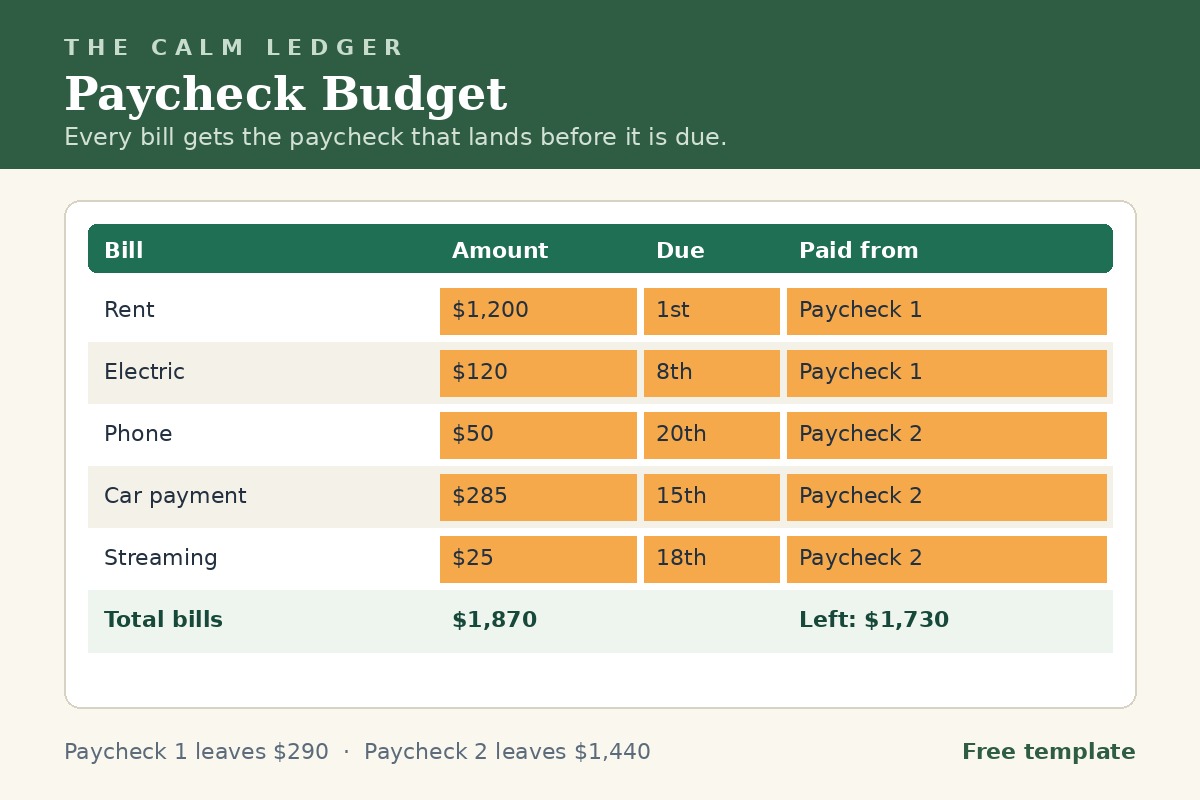
Most budgets are monthly. Most people are paid every two weeks. This one plans each paycheck on its own: every bill gets the check that lands before it is due, and you see what's left from each one.
Free, no email needed. Opens in Excel or Google Sheets.
The full version covers more pay schedules and a full year of paychecks, with bill tracking and a running balance for every check.
$12.99 Paycheck Budget Planner — instant download on Etsy.
Enter your email and we’ll send the free checklist that finds forgotten subscriptions and everyday money leaks. Plus occasional calm, practical money notes.
Free, always. No spam, no shame, unsubscribe anytime with one click.
Yes. No email, no signup, no card. Download the file and keep it.
Paid every two weeks, twice a year a month gets a third check. Treat that one as a bonus — it is not part of the normal plan.
Yes. Upload the .xlsx to Google Drive, open it, and choose File → Save as Google Sheets. The formulas carry over.
The same idea works: one column per paycheck, bills assigned to the check before they are due. The full Paycheck Budget Planner on Etsy is built for more pay schedules.