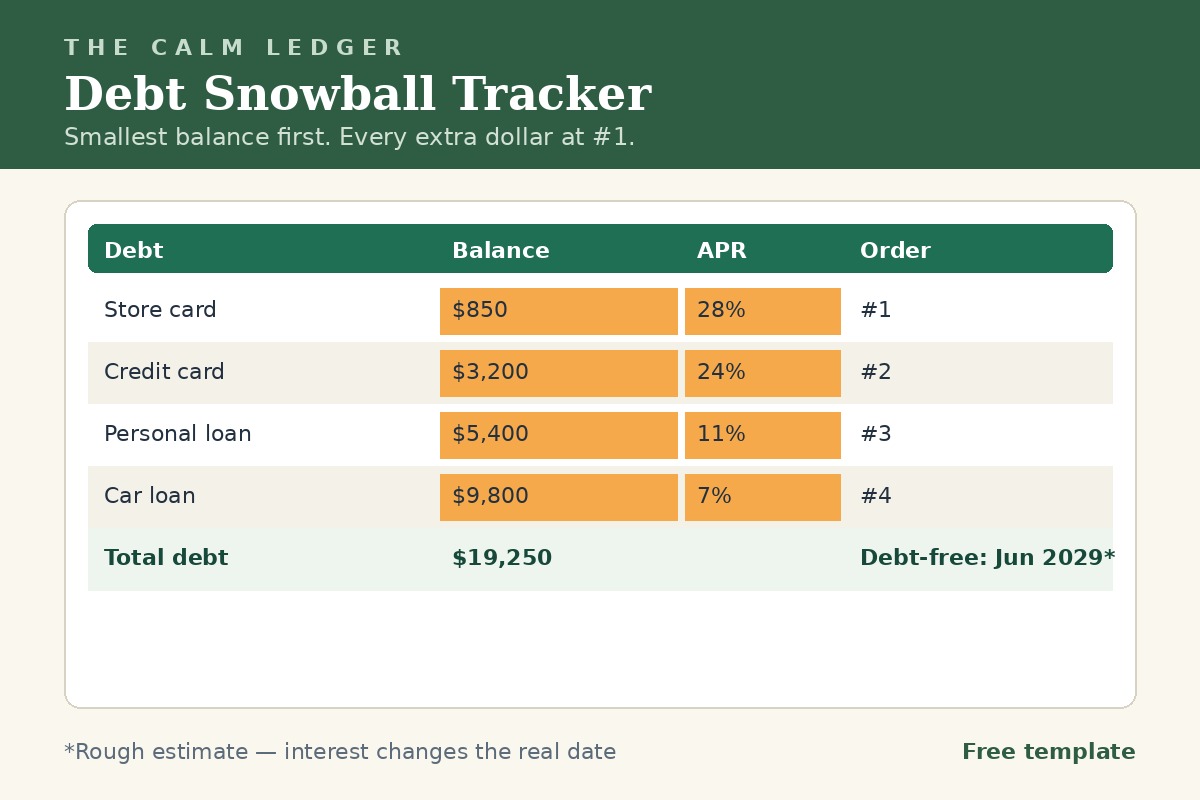
List every debt once. The sheet ranks them smallest balance first, adds up what you pay each month, and gives you a rough date for when it could all be gone.
Free, no email needed. Opens in Excel or Google Sheets.
The full version adds a sinking-fund tracker alongside the payoff plan, so the next big expense doesn't become the next debt.
$12.99 Debt Payoff + Sinking Fund Bundle — instant download on Etsy.
Enter your email and we’ll send the free checklist that finds forgotten subscriptions and everyday money leaks. Plus occasional calm, practical money notes.
Free, always. No spam, no shame, unsubscribe anytime with one click.
Yes. No email, no signup, no card. Download the file and keep it.
No. It is a rough estimate — interest changes the real date, and your lender's statement governs what you actually owe. Use it as a direction, not a deadline.
This sheet uses the snowball: smallest balance first, because clearing a whole debt keeps people going. The order column shows the ranking either way.
Yes. Upload the .xlsx to Google Drive, open it, and choose File → Save as Google Sheets. The formulas carry over.